Linux-Practice-3
[root@localhost ~]# history
31 alias
32 wcl
33 alias
34 grep -v ‘^#’ /etc/profile | grep -v ‘^$’ | wc-l
35 grep -v ‘^#’ /etc/profile | grep -v ‘^$’ | wc -l
36 cat /etc/profile
37 grep -v ‘^#’ /etc/profile | grep -v ‘^$’
38 grep -v ‘^#’ /etc/profile | grep -v ‘^$’ | wc -l
39 cat /etc/profile
40 grep -v ‘^#’ /etc/profile | grep -v ‘^$’
41* grep
44 grep -v ‘^#|^$’ /etc/profile
45 grep -v ‘^#|^$’ /etc/profile |wc-l
46 grep -v ‘^#|^$’ /etc/profile | wc-l
47 grep -v ‘^#|^$’ /etc/profile | wc- l
48 grep -v ‘^#|^$’ /etc/profile | wc - l
49 grep -v ‘^#|^$’ /etc/profile | wc -l
50 grep -v ‘^#’ /etc/profile | grep -v ‘^$’
51 grep -v ‘^#|^$’ /etc/profile | wc -l
52 grep -v ‘^#’ /etc/profile | grep -v ‘^$’ | wc -l
53 grep -ve ‘^#|^$’ /etc/profile | wc -l
54 grep -vE ‘^#|^$’ /etc/profile | wc -l
55 grep -v ‘^#’ /etc/profile | grep -v ‘^$’ | wc -l
56 grep -vE ‘^#|^$’ /etc/profile | wc -l
57 egrep -v ‘^#|^$’ /etc/profile | wc -l
58 alias wcl=”
59 q
60 alias wcl=”egrep -v ‘^#|^$’ /etc/profile | wc -l”
61 wcl
62 which find
63 find –help
64 man grep
65 grep “nologin$” /etc/passwd
66 grep “s#” /etc/passwd
67 grep “#s” /etc/passwd
68 grep “#gn” /etc/passwd
69 grep “nologin$” /etc/passwd
70 mkdir /tmp/{a,b,c}
71 ll /tmp/
72 ll -t /tmp/
73 rm -rf /tmp/{a,b,c}
74 ll -t /tmp/
75 mkdir /tmp/{a,b,c}
76 ll -t /tmp/
77 rm -rf /tmp/{a,b,c}
78 ll -t /tmp/
79 find /etc -type f -size +1m
80 find /etc -type f -size +1M
81 find /etc -type f -size +1M ls
82 find /etc -type f -size +1M -ls
83 find /etc -type f -size +1M
84 echo “Hello World” >/tmp/hi.txt
85 cat /tmp/hi.txt
86 find / -user student 2>/dev/null
87 find / -user student
88 find / -user student 2>/dev/null
89 hwclock
90 date “+%Y/%m/%d %H:%M:%S”
91 date
92 hwclock
93 tail /var/log/messages
94 find /etc -type f -ctime -1
95 find /etc -mtime -1
96 find /etc -mmin -1
97 find /etc -mmin -60
98 find /etc -mmin -360
99 find /etc -type f -ctime -1
100 find /etc -mtime -1
101 find /tmp -type f -name “.txt” -exec rm -f {} ;
102 history
[root@localhost ~]#
27.查看系统中已经设置的别名命令。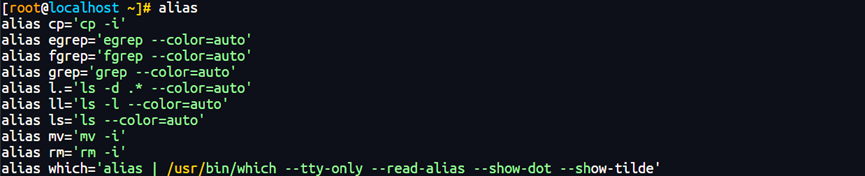
28.创建名为 wcl的命令别名,统计/etc/profle 文件中不以#开头且不是空白行的行数

29.找到 find 命令的命令文件路径
30.查看 find 命令的简要帮助信息
31.查看 grep 命令的帮助手册。
32.查看历史命令
history
33.查找/etc/passwd文件中所有以“nologin”结尾的行
34、假设存在3个目录:/tmp/a、/tmp/b 和/tmp/c,要求用 一条命令强制删除这3目录。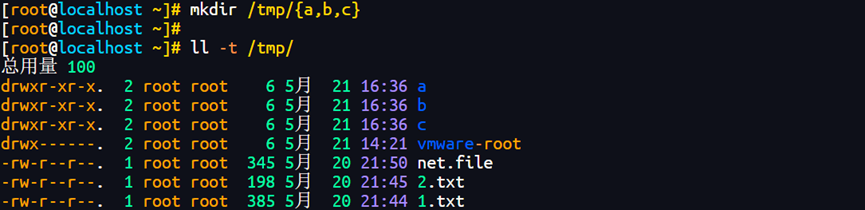

rm -rf /tmp/a /tmp/b /tmp/c (最安全的写法)
35.查找/etc 目录下大于 1MB 且类型为普通文件的所有文件。
参数 含义
/etc 查找目录
-type f 普通文件
-size +1M 大于 1MB
36.在/tmp目录中创建一个名为hi.txt的文件,文件内容为“Hello World”
37、将执行“fnd/-user student”命令时产生的错误信息重定向到/dev/null 文件中
find / -user student 查找属于 student 用户的所有文件
2> 重定向标准错误(文件描述符 2)
/dev/null 丢弃所有写入的数据(黑洞)
38.如何查看系统时钟与硬件时钟?
权限不足:读取或修改硬件时钟通常需要 root 权限。普通用户(如 wlysy)默认没有访问 /dev/rtc 或 /dev/rtc0 设备文件的权限。
39.以“年/月/日 时:分:秒”的形式显示当前日期和时间,如“2023/05/26 15:02:48”
40.某台Linux 服务器疑似正在遭受黑客攻击,作为管理员的你需要实时观察系统日志文件var/log/messages 中的最新内容,该如何用命令实现?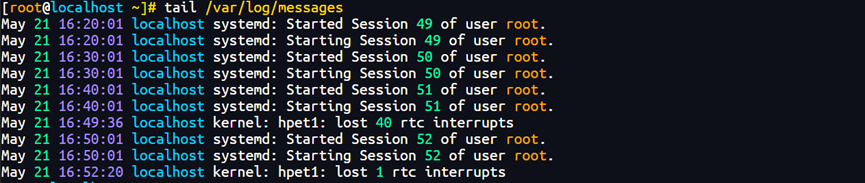
41.在/etc目录中查找最近1天之内被改动过的文件。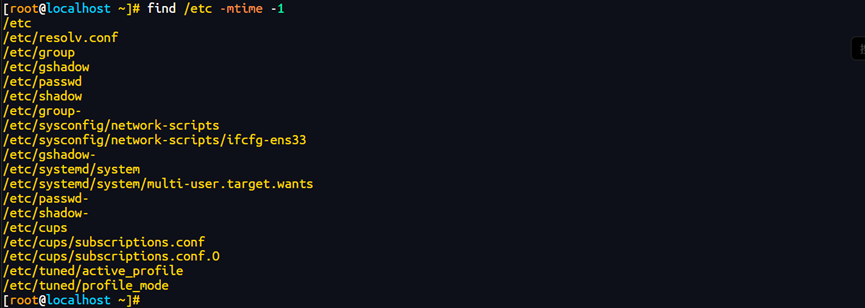
42.从tmp 目录及其子目录中找出扩展名为.txt的文件,并将之删除,
参数 含义
/tmp 查找目录
-type f 普通文件
-name “.txt” 以 .txt 结尾的文件
-exec rm -f {} ; 对找到的每个文件执行删除操作