- 新建一个user1用户,UID、GID、主目录均按默认;
1
2
3
4
5
| [root@localhost ~]# useradd user1
[root@localhost ~]#
[root@localhost ~]# id user1
uid=1002(user1) gid=1002(user1) 组=1002(user1)
[root@localhost ~]#
|
- 新建一个user2用户,UID=800、其余按默认;
1
2
3
4
5
| [root@localhost ~]# useradd -u 800 user2
[root@localhost ~]#
[root@localhost ~]# id user2
uid=800(user2) gid=1003(user2) 组=1003(user2)
[root@localhost ~]#
|
- 新建一个user3用户,默认主目录为/abc、其余默认;并观察这三个用户的信息有什么不同;
1
2
3
4
5
6
7
8
9
10
11
12
13
14
15
16
17
18
19
20
21
22
23
24
25
26
27
| [root@localhost ~]# useradd -d /abc user3
[root@localhost ~]#
[root@localhost ~]# id user3
uid=1003(user3) gid=1004(user3) 组=1004(user3)
[root@localhost ~]#
[root@localhost ~]# tail -3 /etc/passwd
user1:x:1002:1002::/home/user1:/bin/bash
user2:x:800:1003::/home/user2:/bin/bash
user3:x:1003:1004::/abc:/bin/bash
[root@localhost ~]#
[root@localhost ~]# mkdi
mkdict mkdir
[root@localhost ~]# mkdir /abc
mkdir: 无法创建目录"/abc": 文件已存在
[root@localhost ~]#
[root@localhost ~]# ls -ld /abc/
drwx------. 3 user3 user3 78 5月 23 15:39 /abc/
[root@localhost ~]#
[root@localhost ~]# ls -la /abc/
总用量 12
drwx------. 3 user3 user3 78 5月 23 15:39 .
dr-xr-xr-x. 18 root root 235 5月 23 15:39 ..
-rw-r--r--. 1 user3 user3 18 4月 11 2018 .bash_logout
-rw-r--r--. 1 user3 user3 193 4月 11 2018 .bash_profile
-rw-r--r--. 1 user3 user3 231 4月 11 2018 .bashrc
drwxr-xr-x. 4 user3 user3 39 4月 26 20:24 .mozilla
[root@localhost ~]#
|
| 对比项 |
user1 |
user2 |
user3 |
| 用户名 |
user1 |
user2 |
user3 |
| UID |
1002 |
800 |
1003 |
| GID |
1002 |
1003 |
1004 |
| 主目录 |
/home/user1 |
/home/user2 |
/abc |
| 登录 Shell |
/bin/bash |
/bin/bash |
/bin/bash |
| 差异点 |
user1 |
user2 |
user3 |
| —— |
—– |
— |
— |
| UID 分配方式 |
系统自动分配(1002) |
手动指定(800) |
系统自动分配(1003) |
| GID 分配 |
与 UID 相同 |
系统自动分配(1003) |
系统自动分配(1004) |
| 主目录位置 |
默认 /home/user1 |
默认 /home/user2 |
手动指定 /abc |
| 主目录是否在 /home 下 |
✅ 是 |
✅ 是 |
❌ 否 |
- 分别为以上三个用户设置密码为123456;
1
2
3
4
5
6
7
8
9
10
11
12
| [root@localhost ~]# echo "123456" | passwd --stdin user1
更改用户 user1 的密码 。
passwd:所有的身份验证令牌已经成功更新。
[root@localhost ~]#
[root@localhost ~]# echo "123456" | passwd --stdin user2
更改用户 user2 的密码 。
passwd:所有的身份验证令牌已经成功更新。
[root@localhost ~]#
[root@localhost ~]# echo "123456" | passwd --stdin user3
更改用户 user3 的密码 。
passwd:所有的身份验证令牌已经成功更新。
[root@localhost ~]#
|
- 把user1用户改名为u1, UID改为700,主目录为/test;
1
2
3
4
5
6
7
8
9
10
11
12
13
14
15
16
17
| [root@localhost ~]# usermod -l u1 user1
[root@localhost ~]#
[root@localhost ~]# usermod -u 700 u1
[root@localhost ~]#
[root@localhost ~]# usermod -d /test -m u1
[root@localhost ~]#
[root@localhost ~]# id u1
uid=700(u1) gid=1002(user1) 组=1002(user1)
[root@localhost ~]#
[root@localhost ~]# grep u1 /etc/passwd
u1:x:700:1002::/test:/bin/bash
[root@localhost ~]#
[root@localhost ~]# ls -ld /test/
drwx------. 3 u1 user1 78 5月 23 15:31 /test/
[root@localhost ~]# ls -ld /home/test1
ls: 无法访问/home/test1: 没有那个文件或目录
[root@localhost ~]#
|
- 把u1用户锁定,在不同的终端分别登录user2与u1,并观察有什么现象;
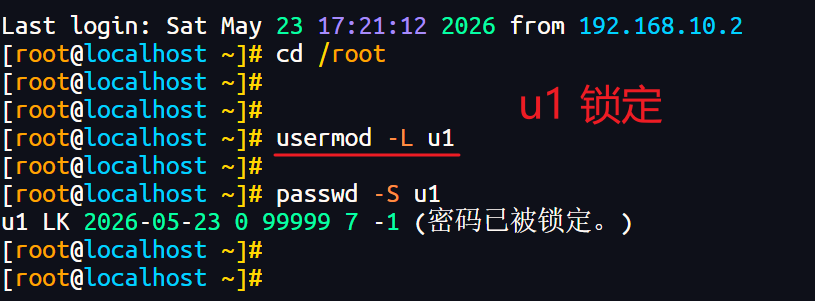
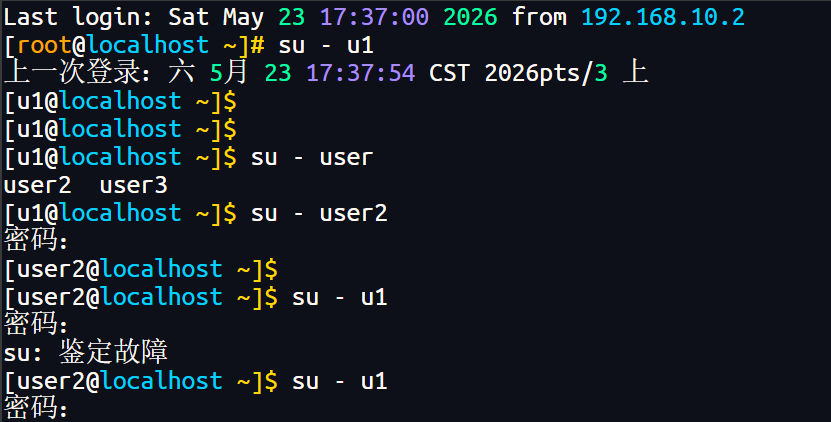
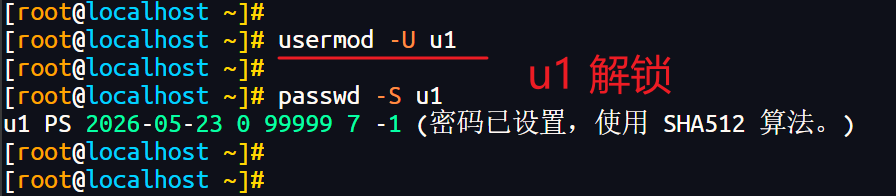
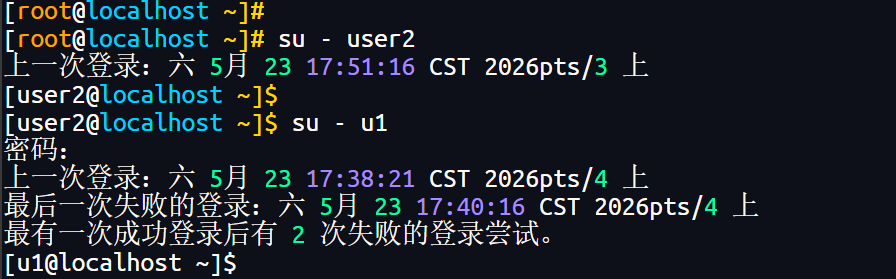
u1 用户被锁定后:
├── root 直接 su - u1 → ✅ 可以(root 特权)
├── 普通用户 su - u1 → ❌ 不可以(需要密码验证)
└── 终端直接登录 → ❌ 不可以(需要密码验证)
- linux中的用户管理主要涉及用户账号文件( )、用户密码文件( )户组文件( )
| 文件 |
完整路径 |
作用 |
| 用户账号文件 |
/etc/passwd |
存储用户基本信息(用户名、UID、GID、主目录、Shell等) |
| 用户密码文件 |
/etc/shadow |
存储用户的加密密码及密码管理信息(有效期、锁定等) |
| 用户组文件 |
/etc/group |
存储组的基本信息(组名、GID、组成员等) |
- 通过id命令查看student用户的身份信息,并将命令执行后的信息全部重定向到黑洞文件中。
1
2
3
4
5
6
7
8
9
10
11
| [root@localhost ~]# id student > /dev/null
id: student: no such user
[root@localhost ~]#
[root@localhost ~]# useradd student
[root@localhost ~]#
[root@localhost ~]# echo "123456" | passwd --stdin student
更改用户 student 的密码 。
passwd:所有的身份验证令牌已经成功更新。
[root@localhost ~]#
[root@localhost ~]# id student > /dev/null
[root@localhost ~]#
|
- 显示系统中用户账号的个数。
1
2
3
4
5
6
7
8
9
10
11
12
13
14
15
16
17
18
19
20
21
22
23
24
25
26
27
28
29
30
31
32
33
34
35
36
37
38
39
40
41
42
43
44
45
46
47
48
49
50
51
| [root@localhost ~]# cat /etc/passwd | wc -l
47
[root@localhost ~]# cat /etc/passwd -n
1 root:x:0:0:root:/root:/bin/bash
2 bin:x:1:1:bin:/bin:/sbin/nologin
3 daemon:x:2:2:daemon:/sbin:/sbin/nologin
4 adm:x:3:4:adm:/var/adm:/sbin/nologin
5 lp:x:4:7:lp:/var/spool/lpd:/sbin/nologin
6 sync:x:5:0:sync:/sbin:/bin/sync
7 shutdown:x:6:0:shutdown:/sbin:/sbin/shutdown
8 halt:x:7:0:halt:/sbin:/sbin/halt
9 mail:x:8:12:mail:/var/spool/mail:/sbin/nologin
10 operator:x:11:0:operator:/root:/sbin/nologin
11 games:x:12:100:games:/usr/games:/sbin/nologin
12 ftp:x:14:50:FTP User:/var/ftp:/sbin/nologin
13 nobody:x:99:99:Nobody:/:/sbin/nologin
14 systemd-network:x:192:192:systemd Network Management:/:/sbin/nologin
15 dbus:x:81:81:System message bus:/:/sbin/nologin
16 polkitd:x:999:998:User for polkitd:/:/sbin/nologin
17 libstoragemgmt:x:998:996:daemon account for libstoragemgmt:/var/run/lsm:/sbin/nologin
18 rpc:x:32:32:Rpcbind Daemon:/var/lib/rpcbind:/sbin/nologin
19 colord:x:997:995:User for colord:/var/lib/colord:/sbin/nologin
20 saslauth:x:996:76:Saslauthd user:/run/saslauthd:/sbin/nologin
21 abrt:x:173:173::/etc/abrt:/sbin/nologin
22 setroubleshoot:x:995:992::/var/lib/setroubleshoot:/sbin/nologin
23 rtkit:x:172:172:RealtimeKit:/proc:/sbin/nologin
24 chrony:x:994:991::/var/lib/chrony:/sbin/nologin
25 rpcuser:x:29:29:RPC Service User:/var/lib/nfs:/sbin/nologin
26 nfsnobody:x:65534:65534:Anonymous NFS User:/var/lib/nfs:/sbin/nologin
27 qemu:x:107:107:qemu user:/:/sbin/nologin
28 unbound:x:993:990:Unbound DNS resolver:/etc/unbound:/sbin/nologin
29 gluster:x:992:989:GlusterFS daemons:/var/run/gluster:/sbin/nologin
30 tss:x:59:59:Account used by the trousers package to sandbox the tcsd daemon:/dev/null:/sbin/nologin
31 usbmuxd:x:113:113:usbmuxd user:/:/sbin/nologin
32 geoclue:x:991:987:User for geoclue:/var/lib/geoclue:/sbin/nologin
33 radvd:x:75:75:radvd user:/:/sbin/nologin
34 pulse:x:171:171:PulseAudio System Daemon:/var/run/pulse:/sbin/nologin
35 gdm:x:42:42::/var/lib/gdm:/sbin/nologin
36 gnome-initial-setup:x:990:984::/run/gnome-initial-setup/:/sbin/nologin
37 sshd:x:74:74:Privilege-separated SSH:/var/empty/sshd:/sbin/nologin
38 avahi:x:70:70:Avahi mDNS/DNS-SD Stack:/var/run/avahi-daemon:/sbin/nologin
39 postfix:x:89:89::/var/spool/postfix:/sbin/nologin
40 ntp:x:38:38::/etc/ntp:/sbin/nologin
41 tcpdump:x:72:72::/:/sbin/nologin
42 x:x:1000:1000:x:/home/x:/bin/bash
43 teacher:x:1001:1001::/home/teacher:/bin/bash
44 user2:x:800:1003::/home/user2:/bin/bash
45 user3:x:1003:1004::/abc:/bin/bash
46 u1:x:700:1002::/test:/bin/bash
47 student:x:1004:1005::/home/student:/bin/bash
[root@localhost ~]#
|